Displaying values of variables in TCL

set x 10

o/p:10

puts $x

o/p:10

set string “welcome to India”

o/p:welcome to India

puts $string

o/p:welcome to India

puts hai ; puts bye

o/p:

hai

bye

set i hai ; set x 5 ; puts "$i $x"

o/p:hai 5

set a 10.00 ; puts “I have $a rupees”

o/p:I have 10.00 rupees

set i hai ; set x 5 ; puts "$i \$x"

o/p:hai $x

puts {hai bye}

o/p:hai bye

set i 5

expr { $i<10 ? ($i+10) : ($i-10) }

o/p:15

set i [expr {$i+1} ]

o/p:6

Putting Comments in TCL

#this is comment

Displaying messages and values in TCL

puts India

o/p:India

puts “welcome to India”

o/p:welcome to India

puts 58

o/p:58

echo welcome to India

welcome to India

Files handling Operations in TCL

r

Open the file for reading only; the file must already exist. This is the default value if access is not specified.

r+

Open the file for both reading and writing; the file must already exist.

w

Open the file for writing only. Truncate it if it exists. If it doesn't exist, create a new file.

w+

Open the file for reading and writing. Truncate it if it exists. If it doesn't exist, create a new file.

a

Open the file for writing only. The file must already exist, and the file is positioned so that new data is appended to the file.

a+

Open the file for reading and writing. If the file doesn't exist, create a new empty file. Set the initial access position to the end of the file.

Small example programs for tcl

#1.tcl keywords and variables are case sensitve.Filenames are not casesensitive

#2.puts $i AND puts "$i" are same

#3.arguments should be present at macro

#4.Unknown variables .we get error

puts "welcome to tcl"

set i 5

if {$i<10} {

puts "i value is $i" }

for { set i 6} {$i<9} {incr i } {

puts " i value is $i" }

while { $i<12} {

puts "i value is $i"

incr i }

for { set k 5 } {$k>0} {incr k -1} {

puts "k value is $k" }

set j [expr {$i+1} ]

puts "j value is $j"

proc macro1 {code} {

set id $code

set k1 [string index $id 0]

set k2 [string index $id 1]

set k3 [string index $id 2]

puts "the value of k1 is $k1 $k2 $k3"

}

proc macro3 {bc} {

puts "call another macro"

proc macro4 {dc} {

puts "this is another macro"

}

}

proc optional {a b c {d ""} } {

if {$d eq ""} {

puts "there is no d value" } else {

puts "d value is $d" }

}

set n 21

if {n!=20} {

puts "n is not 20" }

proc return1 { x y } {

set a $x

set b $y

set c [expr {$a+$b}]

return $c

}

puts "ur return value is :[return1 10 20]"

proc file1 {d} {

set fp [open "D:\\sample.txt" r]

while {[gets $fp data]>=0} {

puts [gets $fp data]

puts $data

}

close $fp

}

Tax Refunds mail- SCAM !! Be Careful

image

When you click on the link "CLICK HERE", it takes you to http://beauxartsschool.com/webalizer/web/1/refunds/index.html?id=refund which looks like a fishy website, as IT Dept websites will always have https or .in or .gov in the web address.


image

If you select AXIS BANK/ HDFCBANK or any other bank, it will take you to respective Bank's Homepage but the web url address stills remains of http://beauxartsschool.com.


image

image

DO NOT ENTER ANY BANK DETAILS DATA IN ANY OF THESE OR YOU WILL BE PARTED WITH YOUR HARD-EARNED MONEY IN A JIFFY. Please forward to as many people as possible and make them aware of these phishing mails.

The Android Google Reader application

It’s been a long time coming, but the official Google Reader app for Android is finally here. Let’s jump into the features, shall we?

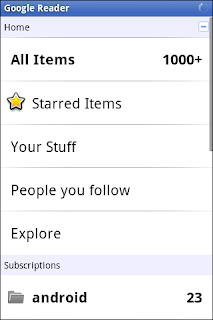
The app supports all the basics you’d expect like unread counts, friends, sharing, liking, and starring, but it also has a whole lot more, including:

  • Multiple accounts
  • Synced preferences
  • Full subscription features (subscribe and search from your phone)
  • Search

Google Reader Android app screenshot

A couple harder to discover features we’d like to highlight:

  • Volume-key navigation: if you enable this in the settings, you can navigate by using your phone’s volume keys for next and previous
  • Long-press on a folder or subscription to bring up a contextual menu that lets you rename, unsubscribe or change folders
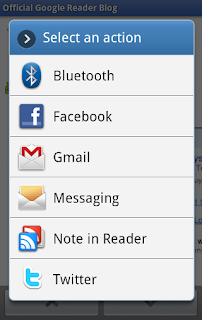
  • If you hit the menu key on an individual item, you can use the “send” feature which integrates with other apps on your phone to send the item using any 3rd party app

Send menu screenshot

We’re really excited to make the first version of the app available today, and we hope you’ll try it out and let us know what you think on Twitter or our help forums.

Update: Here's a link to the app on Android Market. It should run on Donut and higher.

QR code with Market link